Day 4 Kubernetes Services and Service Discovery

What is a Service in Kubernetes?
A Service enables network access to a set of Pods in Kubernetes.
Services select Pods based on their labels. When a network request is made to the service, it selects all Pods in the cluster matching the service's selector, chooses one of them, and forwards the network request to it.
Although each Pod has a unique IP address, those IPs are not exposed outside the cluster without a Service. Services allow your applications to receive traffic. Services can be exposed in different ways by specifying a type in the spec of the Service:
ClusterIP (default) - Exposes the Service on an internal IP in the cluster. This type makes the Service only reachable from within the cluster.
NodePort - Exposes the Service on the same port of each selected Node in the cluster using NAT. Makes a Service accessible from outside the cluster using
<NodeIP>:<NodePort>. Superset of ClusterIP.LoadBalancer - Creates an external load balancer in the current cloud (if supported) and assigns a fixed, external IP to the Service. Superset of NodePort.
ExternalName - Maps the Service to the contents of the
externalNamefield (e.g.foo.bar.example.com), by returning aCNAMErecord with its value. No proxying of any kind is set up. This type requires v1.7 or higher ofkube-dns, or CoreDNS version 0.0.8 or higher.
Services and Labels
A Service routes traffic across a set of Pods. Services are the abstraction that allows pods to die and replicate in Kubernetes without impacting your application. Discovery and routing among dependent Pods (such as the frontend and backend components in an application) are handled by Kubernetes Services.
Services match a set of Pods using labels and selectors, a grouping primitive that allows logical operation on objects in Kubernetes. Labels are key/value pairs attached to objects and can be used in any number of ways:
Designate objects for development, test, and production
Embed version tags
Classify an object using tags
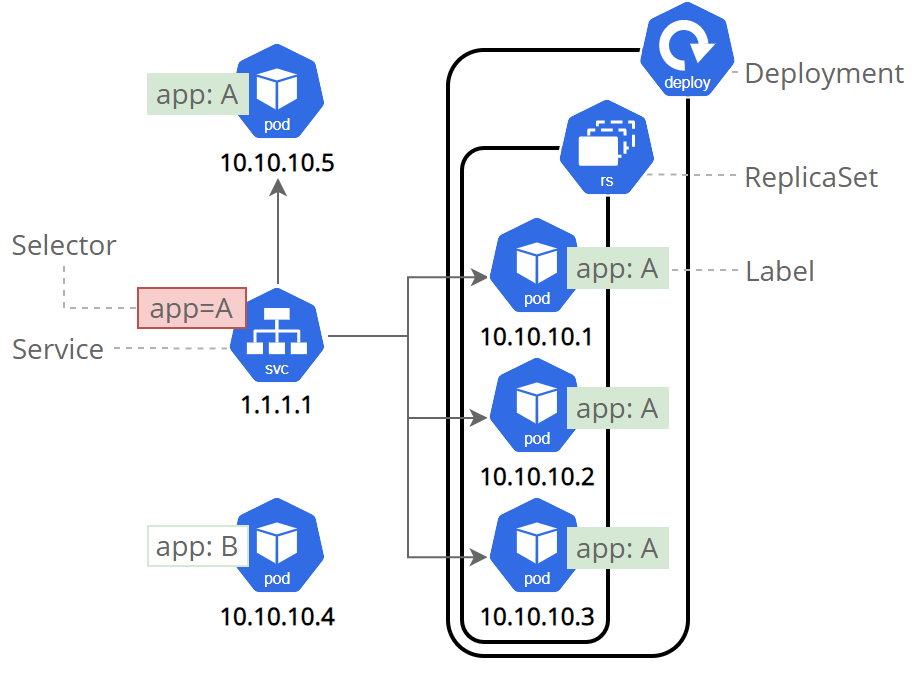
Labels can be attached to objects at creation time or later on. They can be modified at any time. Let's expose our application now using a Service and apply some labels.
Create a new Service
Let’s verify that our application is running. We’ll use the kubectl get command and look for existing Pods:
kubectl get pods
If no pods are running then it means the interactive environment is still reloading its previous state. Please wait a couple of seconds and list the Pods again. You can continue once you see the one Pod running.
Next, let’s list the current Services from our cluster:
kubectl get services
We have a Service called kubernetes that is created by default when minikube starts the cluster. To create a new service and expose it to external traffic we'll use the expose command with NodePort as parameter.
kubectl expose deployment/kubernetes-bootcamp --type="NodePort" --port 8080
Let's run again the get services subcommand:
kubectl get services
We have now a running Service called kubernetes-bootcamp. Here we see that the Service received a unique cluster-IP, an internal port and an external-IP (the IP of the Node).
To find out what port was opened externally (for the type: NodePort Service) we’ll run the describe service subcommand:
kubectl describe services/kubernetes-bootcamp
Create an environment variable called NODE_PORT that has the value of the Node port assigned:
export NODE_PORT="$(kubectl get services/kubernetes-bootcamp -o go-template='{{(index .spec.ports 0).nodePort}}')"echo "NODE_PORT=$NODE_PORT"
Now we can test that the app is exposed outside of the cluster using curl, the IP address of the Node and the externally exposed port:
curl http://"$(minikube ip):$NODE_PORT"
And we get a response from the server. The Service is exposed.
Step 2: Using labels
The Deployment created automatically a label for our Pod. With the describe deployment subcommand you can see the name (the key) of that label:
kubectl describe deployment
Let’s use this label to query our list of Pods. We’ll use the kubectl get pods command with -l as a parameter, followed by the label values:
kubectl get pods -l app=kubernetes-bootcamp
You can do the same to list the existing Services:
kubectl get services -l app=kubernetes-bootcamp
Get the name of the Pod and store it in the POD_NAME environment variable:
export POD_NAME="$(kubectl get pods -o go-template --template '{{range .items}}{{.metadata.name}}{{"\n"}}{{end}}')"echo "Name of the Pod: $POD_NAME"
To apply a new label we use the label subcommand followed by the object type, object name and the new label:
kubectl label pods "$POD_NAME" version=v1
This will apply a new label to our Pod (we pinned the application version to the Pod), and we can check it with the describe pod command:
kubectl describe pods "$POD_NAME"
We see here that the label is attached now to our Pod. And we can query now the list of pods using the new label:
kubectl get pods -l version=v1
And we see the Pod.
Deleting a service
To delete Services you can use the delete service subcommand. Labels can be used also here:
kubectl delete service -l app=kubernetes-bootcamp
Confirm that the Service is gone:
kubectl get services
This confirms that our Service was removed. To confirm that route is not exposed anymore you can curl the previously exposed IP and port:
curl http://"$(minikube ip):$NODE_PORT"
This proves that the application is not reachable anymore from outside of the cluster. You can confirm that the app is still running with a curl from inside the pod:
kubectl exec -ti $POD_NAME -- curl http://localhost:8080
We see here that the application is up. This is because the Deployment is managing the application. To shut down the application, you would need to delete the Deployment as well.
DNS for Services and Pods
Kubernetes creates DNS records for Services and Pods. You can contact Services with consistent DNS names instead of IP addresses.
Kubernetes publishes information about Pods and Services which is used to program DNS. Kubelet configures Pods' DNS so that running containers can lookup Services by name rather than IP.
Services defined in the cluster are assigned DNS names. By default, a client Pod's DNS search list includes the Pod's own namespace and the cluster's default domain.
Namespaces of Services
A DNS query may return different results based on the namespace of the Pod making it. DNS queries that don't specify a namespace are limited to the Pod's namespace. Access Services in other namespaces by specifying it in the DNS query.
For example, consider a Pod in a test namespace. A data Service is in the prod namespace.
A query for data returns no results, because it uses the Pod's test namespace.
A query for data.prod returns the intended result, because it specifies the namespace.
DNS queries may be expanded using the Pod's /etc/resolv.conf. Kubelet configures this file for each Pod. For example, a query for just data may be expanded to data.test.svc.cluster.local. The values of the search option are used to expand queries. To learn more about DNS queries, see the resolv.conf manual page.
nameserver 10.32.0.10
search <namespace>.svc.cluster.local svc.cluster.local cluster.local
options ndots:5
In summary, a Pod in the test namespace can successfully resolve either data.prod or data.prod.svc.cluster.local.
DNS Records
What objects get DNS records?
Services
Pods
The following sections detail the supported DNS record types and layout that is supported. Any other layout or names or queries that happen to work are considered implementation details and are subject to change without warning. For more up-to-date specification, see Kubernetes DNS-Based Service Discovery.
Services
A/AAAA records
"Normal" (not headless) Services are assigned DNS A and/or AAAA records, depending on the IP family or families of the Service, with a name of the form my-svc.my-namespace.svc.cluster-domain.example. This resolves to the cluster IP of the Service.
Headless Services (without a cluster IP) Services are also assigned DNS A and/or AAAA records, with a name of the form my-svc.my-namespace.svc.cluster-domain.example. Unlike normal Services, this resolves to the set of IPs of all of the Pods selected by the Service. Clients are expected to consume the set or else use standard round-robin selection from the set.
SRV records
SRV Records are created for named ports that are part of normal or headless services. For each named port, the SRV record has the form _port-name._port-protocol.my-svc.my-namespace.svc.cluster-domain.example. For a regular Service, this resolves to the port number and the domain name: my-svc.my-namespace.svc.cluster-domain.example. For a headless Service, this resolves to multiple answers, one for each Pod that is backing the Service, and contains the port number and the domain name of the Pod of the form hostname.my-svc.my-namespace.svc.cluster-domain.example.
Pods
A/AAAA records
In general a Pod has the following DNS resolution:
pod-ip-address.my-namespace.pod.cluster-domain.example.
For example, if a Pod in the default namespace has the IP address 172.17.0.3, and the domain name for your cluster is cluster.local, then the Pod has a DNS name:
172-17-0-3.default.pod.cluster.local.
Any Pods exposed by a Service have the following DNS resolution available:
pod-ip-address.service-name.my-namespace.svc.cluster-domain.example.
Pod's hostname and subdomain fields
Currently when a Pod is created, its hostname (as observed from within the Pod) is the Pod's metadata.name value.
The Pod spec has an optional hostname field, which can be used to specify a different hostname. When specified, it takes precedence over the Pod's name to be the hostname of the Pod (again, as observed from within the Pod). For example, given a Pod with spec.hostname set to "my-host", the Pod will have its hostname set to "my-host".
The Pod spec also has an optional subdomain field which can be used to indicate that the pod is part of sub-group of the namespace. For example, a Pod with spec.hostname set to "foo", and spec.subdomain set to "bar", in namespace "my-namespace", will have its hostname set to "foo" and its fully qualified domain name (FQDN) set to "foo.bar.my-namespace.svc.cluster.local" (once more, as observed from within the Pod).
If there exists a headless Service in the same namespace as the Pod, with the same name as the subdomain, the cluster's DNS Server also returns A and/or AAAA records for the Pod's fully qualified hostname.
Example:
apiVersion: v1
kind: Service
metadata:
  name: busybox-subdomain
spec:
  selector:
    name: busybox
  clusterIP: None
  ports:
  - name: foo # name is not required for single-port Services
    port: 1234
---
apiVersion: v1
kind: Pod
metadata:
  name: busybox1
  labels:
    name: busybox
spec:
  hostname: busybox-1
  subdomain: busybox-subdomain
  containers:
  - image: busybox:1.28
    command:
      - sleep
      - "3600"
    name: busybox
---
apiVersion: v1
kind: Pod
metadata:
  name: busybox2
  labels:
    name: busybox
spec:
  hostname: busybox-2
  subdomain: busybox-subdomain
  containers:
  - image: busybox:1.28
    command:
      - sleep
      - "3600"
    name: busybox
Given the above Service "busybox-subdomain" and the Pods which set spec.subdomain to "busybox-subdomain", the first Pod will see its own FQDN as "busybox-1.busybox-subdomain.my-namespace.svc.cluster-domain.example". DNS serves A and/or AAAA records at that name, pointing to the Pod's IP. Both Pods "busybox1" and "busybox2" will have their own address records.
An EndpointSlice can specify the DNS hostname for any endpoint addresses, along with its IP.
Note: Because A and AAAA records are not created for Pod names, hostname is required for the Pod's A or AAAA record to be created. A Pod with no hostname but with subdomain will only create the A or AAAA record for the headless Service (busybox-subdomain.my-namespace.svc.cluster-domain.example), pointing to the Pods' IP addresses. Also, the Pod needs to be ready in order to have a record unless publishNotReadyAddresses=True is set on the Service.
Pod's setHostnameAsFQDN field
FEATURE STATE: Kubernetes v1.22 [stable]
When a Pod is configured to have fully qualified domain name (FQDN), its hostname is the short hostname. For example, if you have a Pod with the fully qualified domain name busybox-1.busybox-subdomain.my-namespace.svc.cluster-domain.example, then by default the hostname command inside that Pod returns busybox-1 and the hostname --fqdn command returns the FQDN.
When you set setHostnameAsFQDN: true in the Pod spec, the kubelet writes the Pod's FQDN into the hostname for that Pod's namespace. In this case, both hostname and hostname --fqdn return the Pod's FQDN.
Note:
In Linux, the hostname field of the kernel (the nodename field of struct utsname) is limited to 64 characters.
If a Pod enables this feature and its FQDN is longer than 64 character, it will fail to start. The Pod will remain in Pending status (ContainerCreating as seen by kubectl) generating error events, such as Failed to construct FQDN from Pod hostname and cluster domain, FQDN long-FQDN is too long (64 characters is the max, 70 characters requested). One way of improving user experience for this scenario is to create an admission webhook controller to control FQDN size when users create top level objects, for example, Deployment.
Pod's DNS Policy
DNS policies can be set on a per-Pod basis. Currently Kubernetes supports the following Pod-specific DNS policies. These policies are specified in the dnsPolicy field of a Pod Spec.
"
Default": The Pod inherits the name resolution configuration from the node that the Pods run on. See related discussion for more details."
ClusterFirst": Any DNS query that does not match the configured cluster domain suffix, such as "www.kubernetes.io", is forwarded to an upstream nameserver by the DNS server. Cluster administrators may have extra stub-domain and upstream DNS servers configured. See related discussion for details on how DNS queries are handled in those cases."
ClusterFirstWithHostNet": For Pods running with hostNetwork, you should explicitly set its DNS policy to "ClusterFirstWithHostNet". Otherwise, Pods running with hostNetwork and"ClusterFirst"will fallback to the behavior of the"Default"policy.- Note: This is not supported on Windows. See below for details
"
None": It allows a Pod to ignore DNS settings from the Kubernetes environment. All DNS settings are supposed to be provided using thednsConfigfield in the Pod Spec. See Pod's DNS config subsection below.
Note: "Default" is not the default DNS policy. If dnsPolicy is not explicitly specified, then "ClusterFirst" is used.
The example below shows a Pod with its DNS policy set to "ClusterFirstWithHostNet" because it has hostNetwork set to true.
apiVersion: v1
kind: Pod
metadata:
  name: busybox
  namespace: default
spec:
  containers:
  - image: busybox:1.28
    command:
      - sleep
      - "3600"
    imagePullPolicy: IfNotPresent
    name: busybox
  restartPolicy: Always
  hostNetwork: true
  dnsPolicy: ClusterFirstWithHostNet
Pod's DNS Config
FEATURE STATE: Kubernetes v1.14 [stable]
Pod's DNS Config allows users more control on the DNS settings for a Pod.
The dnsConfig field is optional and it can work with any dnsPolicy settings. However, when a Pod's dnsPolicy is set to "None", the dnsConfig field has to be specified.
Below are the properties a user can specify in the dnsConfig field:
nameservers: a list of IP addresses that will be used as DNS servers for the Pod. There can be at most 3 IP addresses specified. When the Pod'sdnsPolicyis set to "None", the list must contain at least one IP address, otherwise this property is optional. The servers listed will be combined to the base nameservers generated from the specified DNS policy with duplicate addresses removed.searches: a list of DNS search domains for hostname lookup in the Pod. This property is optional. When specified, the provided list will be merged into the base search domain names generated from the chosen DNS policy. Duplicate domain names are removed. Kubernetes allows for at most 6 search domains.options: an optional list of objects where each object may have anameproperty (required) and avalueproperty (optional). The contents in this property will be merged to the options generated from the specified DNS policy. Duplicate entries are removed.
The following is an example Pod with custom DNS settings:
service/networking/custom-dns.yaml

apiVersion: v1
kind: Pod
metadata:
  namespace: default
  name: dns-example
spec:
  containers:
    - name: test
      image: nginx
  dnsPolicy: "None"
  dnsConfig:
    nameservers:
      - 192.0.2.1 # this is an example
    searches:
      - ns1.svc.cluster-domain.example
      - my.dns.search.suffix
    options:
      - name: ndots
        value: "2"
      - name: edns0
When the Pod above is created, the container test gets the following contents in its /etc/resolv.conf file:
nameserver 192.0.2.1
search ns1.svc.cluster-domain.example my.dns.search.suffix
options ndots:2 edns0
For IPv6 setup, search path and name server should be set up like this:
kubectl exec -it dns-example -- cat /etc/resolv.conf
The output is similar to this:
nameserver 2001:db8:30::a
search default.svc.cluster-domain.example svc.cluster-domain.example cluster-domain.example
options ndots:5
DNS search domain list limits
FEATURE STATE: Kubernetes 1.26 [beta]
Kubernetes itself does not limit the DNS Config until the length of the search domain list exceeds 32 or the total length of all search domains exceeds 2048. This limit applies to the node's resolver configuration file, the Pod's DNS Config, and the merged DNS Config respectively.
Note:
Some container runtimes of earlier versions may have their own restrictions on the number of DNS search domains. Depending on the container runtime environment, the pods with a large number of DNS search domains may get stuck in the pending state.
It is known that containerd v1.5.5 or earlier and CRI-O v1.21 or earlier have this problem.
DNS resolution on Windows nodes
ClusterFirstWithHostNet is not supported for Pods that run on Windows nodes. Windows treats all names with a
.as a FQDN and skips FQDN resolution.On Windows, there are multiple DNS resolvers that can be used. As these come with slightly different behaviors, using the
Resolve-DNSNamepowershell cmdlet for name query resolutions is recommended.On Linux, you have a DNS suffix list, which is used after resolution of a name as fully qualified has failed. On Windows, you can only have 1 DNS suffix, which is the DNS suffix associated with that Pod's namespace (example:
mydns.svc.cluster.local). Windows can resolve FQDNs, Services, or network name which can be resolved with this single suffix. For example, a Pod spawned in thedefaultnamespace, will have the DNS suffixdefault.svc.cluster.local. Inside a Windows Pod, you can resolve bothkubernetes.default.svc.cluster.localandkubernetes, but not the partially qualified names (kubernetes.defaultorkubernetes.default.svc).
Using CoreDNS for Service Discovery
This page describes the CoreDNS upgrade process and how to install CoreDNS instead of kube-dns.
Before you begin
You need to have a Kubernetes cluster, and the kubectl command-line tool must be configured to communicate with your cluster. It is recommended to run this tutorial on a cluster with at least two nodes that are not acting as control plane hosts. If you do not already have a cluster, you can create one by using minikube or you can use one of these Kubernetes playgrounds:
Your Kubernetes server must be at or later than version v1.9. To check the version, enterkubectl version.
About CoreDNS
CoreDNS is a flexible, extensible DNS server that can serve as the Kubernetes cluster DNS. Like Kubernetes, the CoreDNS project is hosted by the CNCF.
You can use CoreDNS instead of kube-dns in your cluster by replacing kube-dns in an existing deployment, or by using tools like kubeadm that will deploy and upgrade the cluster for you.
Installing CoreDNS
For manual deployment or replacement of kube-dns, see the documentation at the CoreDNS GitHub project.
Migrating to CoreDNS
Upgrading an existing cluster with kubeadm
In Kubernetes version 1.21, kubeadm removed its support for kube-dns as a DNS application. For kubeadm v1.27, the only supported cluster DNS application is CoreDNS.
You can move to CoreDNS when you use kubeadm to upgrade a cluster that is using kube-dns. In this case, kubeadm generates the CoreDNS configuration ("Corefile") based upon the kube-dns ConfigMap, preserving configurations for stub domains, and upstream name server.
Upgrading CoreDNS
You can check the version of CoreDNS that kubeadm installs for each version of Kubernetes in the page CoreDNS version in Kubernetes.
CoreDNS can be upgraded manually in case you want to only upgrade CoreDNS or use your own custom image. There is a helpful guideline and walkthrough available to ensure a smooth upgrade. Make sure the existing CoreDNS configuration ("Corefile") is retained when upgrading your cluster.
If you are upgrading your cluster using the kubeadm tool, kubeadm can take care of retaining the existing CoreDNS configuration automatically.
Conclusion
In this article, we have seen how easy it is to expose an application publicly using Kubernetes Services. We also troubleshooted a couple of common scenarios that we may encounter. While the basic concepts are easy to grasp, there is a lot more than that behind the scenes.
The road to migrate an enterprise infrastructure to using Kubernetes is long and full of surprises. If we want a painless alternative, consider using our Managed Kubernetes solution which comes built-in with fully automated day-2 operations, 99.9 SLA for bare-metal or VMs or Kubernetes running on any infrastructure, and Managed Apps for seamless integration with monitoring, logging and other critical Kubernetes services.
Thanks & Regards,
Kamalesh Rana
Linkdin - https://www.linkedin.com/in/kamalesh-rana-devops/
Inspired by #KubeWeek #Kubernetes #Devops #Trainwithshubham Shubham Londhe
